Email marketing for recruiters does two jobs: it wins new clients and it keeps your candidates and past contacts warm until they need you. The recruiters who get results from it do three things well. They build a list segmented into candidates and clients, they send a newsletter worth opening, and they run cold email to hiring managers who have just posted a job.
This guide covers all three, using the approach we run for recruiting and staffing firms every month. And if you read an earlier version of it, a lot has changed. AI agents now do most of the grunt work that used to eat up a recruiter’s week, so in every section I’ll tell you what to hand to an agent, where agents still trip over their own feet, and what you need to check yourself. You’ll get the exact steps, copy-ready email templates for clients and candidates, the rules on who you can legally email in the US, Canada, the UK and the EU, and the numbers that tell you whether it’s working. (For channels beyond email, see our guide to lead generation for recruiters.)
Looking for someone to take the work off your hands? If you’d rather let someone else find new clients through email marketing (or as part of a broader lead generation strategy), check out our done-for-you email marketing service.
Table of contents
- The Two Jobs of Recruitment Email: Clients and Candidates
- Where AI Agents Fit (and Where They Don’t)
- Build and Segment Your Recruitment Email List
- Who You Can Legally Email: US, Canada, UK and EU
- Write a Recruitment Newsletter People Actually Read
- Job Stalking: Cold Email That Wins Staffing Clients
- Most Placeable Candidate (MPC) Emails
- Recruiter Email Templates You Can Copy
- Deliverability: Keep Your Emails Out of Spam
- The Metrics That Tell You It’s Working
- Recruitment Email Marketing FAQs
The Two Jobs of Recruitment Email: Clients and Candidates
Most email marketing advice is written for companies with one kind of customer. Recruiters and staffing firms have two, and they want completely different things from your inbox.
Clients (hiring managers, HR leaders, founders) want to know what’s happening in their talent market and whether you can fill the role that’s been open for six weeks. Emails to them should be short, specific to their industry, and end with an easy way to talk.
Candidates want relevant jobs, salary information and career advice for their field. Emails to them should be useful even when you have no role to offer them right now, so they still open your email the day you do.
Everything that follows depends on keeping these two groups apart. A newsletter or campaign written for both ends up working for neither.
Where AI Agents Fit (and Where They Don’t)
Let’s get the hype out of the way first. An AI agent is an AI tool that works through a multi-step task on its own. It spots a new job posting, researches the company, finds the hiring manager, drafts an opening line and moves on to the next one. Work that used to take a researcher a full day now takes an agent a few minutes.
That’s a big deal for recruitment email marketing. But it doesn’t change what makes it work.
Here’s what agents are great at: research, monitoring, sorting and first drafts. In this guide, that means finding new job postings, finding and enriching contacts, tagging your list, shortlisting newsletter stories, drafting summaries and opening lines, and sorting your replies.
And here’s where they still fall flat on their face:
- They make things up. Ask an agent for a hiring manager’s email and it will happily hand you one that looks perfect and doesn’t exist. Verify everything before you use it.
- They get blocked. Job boards and LinkedIn don’t want bots on their sites, and an agent clicking around in a browser gets blocked just like a scraper does.
- They all sound the same. One AI-written “personal” line looks clever. A thousand of them look like a robot wrote them (because one did), and your readers will notice. So will the spam filters.
- They don’t have your judgment. Which client is worth chasing, what a market shift means for a hiring manager, and whether an anonymous candidate profile gives away who it is are still your calls.
So here’s the rule we follow, and I’d recommend you follow it too: agents research and draft, a human approves anything that gets sent, and the rules on consent and deliverability don’t change one bit.
Build and Segment Your Recruitment Email List
You need people to send emails to before you can worry about what to say. Recruiters have two reliable ways to build a list, and most firms should use both.
1. The lead magnet: offer something valuable in exchange for an email address
If people already find your website through search or social media, a lead magnet turns those visitors into subscribers. It’s a free resource that visitors get in exchange for their email address.
We’ve tested many lead magnets for recruiting firms, and the salary guide is the one that consistently works for both candidates and clients. You can publish one guide for everything, like this one, or separate guides by practice area (such as cloud and cybersecurity). Whichever you choose, ask on the sign-up form whether the person is hiring or looking for a job. That one question makes every email you send afterwards more relevant.
2. The slow build: add contacts from the conversations you’re already having
You talk to candidates and hiring managers all day. When a conversation ends, whether with a placement or a “not right now”, that contact can go on your list, subject to the consent rules in the next section.
Set a regular process to move those contacts from your ATS into your email platform, weekly or monthly. If you leave it, the backlog grows until nobody wants to touch it. If your ATS has built-in newsletter features, use those and skip the transfer entirely.
Where to keep your list
Any mainstream email marketing platform will do. Start with a simple, inexpensive one unless you already know you need complex automation. If you collect sign-ups on a WordPress site, make sure your form connects directly to the platform so new subscribers are added automatically (Gravity Forms integrates with most of them).
Segment the list from day one
At a minimum, tag every contact as a client or a candidate, then by industry or practice area, and by location if you recruit in more than one market.
To see why this matters, take a tech recruiter who places people in cloud, cybersecurity and fintech. One general tech newsletter sent to everyone will lose to six targeted ones: cloud, cybersecurity and fintech editions, each in a client version and a candidate version. The head of a cybersecurity firm doesn’t care about fintech hiring, and a candidate doesn’t care about your fee structure.

Sitting on an ATS full of untagged contacts? This used to be a job for a very patient assistant. Now it’s a job for an agent. Export your contacts with their job titles and notes, then ask Claude or ChatGPT (or an enrichment tool like Clay) to tag each one as a client or a candidate and by practice area. Before you send anything, check a random sample of 50 or so, because some of the tags will be wrong. And use a business plan whose terms say your data won’t be used to train the model. These are your candidates’ personal details, so treat them that way.
Review the list every quarter. Fix contacts with the wrong tag, and remove people who haven’t opened anything in six months or more. A smaller list of engaged people gets better results, and it protects your sender reputation (more on that under deliverability).
Send an automatic welcome email
Every platform, even the free ones, can send an automatic welcome email to new subscribers. Use it to thank them, tell them what you’ll send and how often, give them something useful straight away (your salary guide, a hiring checklist or a market report), and end with one clear next step: browse open roles, or book a call.
Who You Can Legally Email: US, Canada, UK and EU
The rules depend on where the recipient is, not where you are. This is a practical summary, not legal advice.
| Where the recipient is | Consent needed first? | Who you can email | Every email must include |
|---|---|---|---|
| United States CAN-SPAM |
No | Business contacts, lead magnet subscribers and past contacts | Who it’s from, an honest subject line, your physical mailing address, and an unsubscribe link you honor within 10 business days |
| Canada CASL |
Yes | People who ticked a consent box themselves; anyone who inquired, for 6 months; clients you’ve done business with, such as a placement, for 2 years | Who it’s from, how to reach you, and an unsubscribe link you honor within 10 business days |
| United Kingdom PECR and UK GDPR |
Not for corporate addresses; yes for individuals and sole traders | Corporate addresses such as name@company.com. Most candidates need consent. | Who it’s from and a way to opt out |
| European Union GDPR and national rules |
Often, and it varies by country | Treat contacts as opt-in only unless you’ve checked that country’s rules | Who it’s from and a way to opt out |
For Canada in particular, keep a record of how and when you got each contact’s consent.
In every market, the safest habit is the same: record where each contact came from, include an unsubscribe link in every email, and remove people the moment they ask.
And no, AI doesn’t get you off the hook. An email an agent wrote needs the same consent and the same unsubscribe link as one you wrote yourself. Feeding candidate or client data into an AI tool also counts as handling personal information under GDPR, UK GDPR and Canada’s privacy law, so stick with tools whose business terms cover it. (Still not legal advice.)
Write a Recruitment Newsletter People Actually Read
Most recruiter newsletters are self-promotion: a list of open jobs, a team photo and a “we’re hiring” banner. Nobody looks forward to that. The newsletters that get opened are the ones readers find useful, and you can produce one with a simple monthly process.
- Pick one practice area per newsletter. If you recruit across several, start with your biggest one and send that newsletter only to the matching segment.
- List the sources your readers trust: trade publications, industry associations, and the people in your niche on LinkedIn who share useful analysis.
- Have an agent collect stories every week. Give Claude or ChatGPT your source list, your practice area and three or four past stories you liked, with a sentence on why you liked each one. Then ask for a weekly shortlist of news on hiring trends, salary moves, regulation, funding and new tech, with a link for every story. Think of it as training an assistant who never gets bored.
- Let the agent draft the summaries, but write the “so what?” yourself. Check every summary against its link first, because agents love to get a figure or a date slightly wrong. The “so what?” is what makes the newsletter worth opening. It tells a hiring manager what the story means for their team, or tells a candidate what it means for their career and pay. That’s your expertise, and it’s the one part your readers can tell a robot didn’t write.
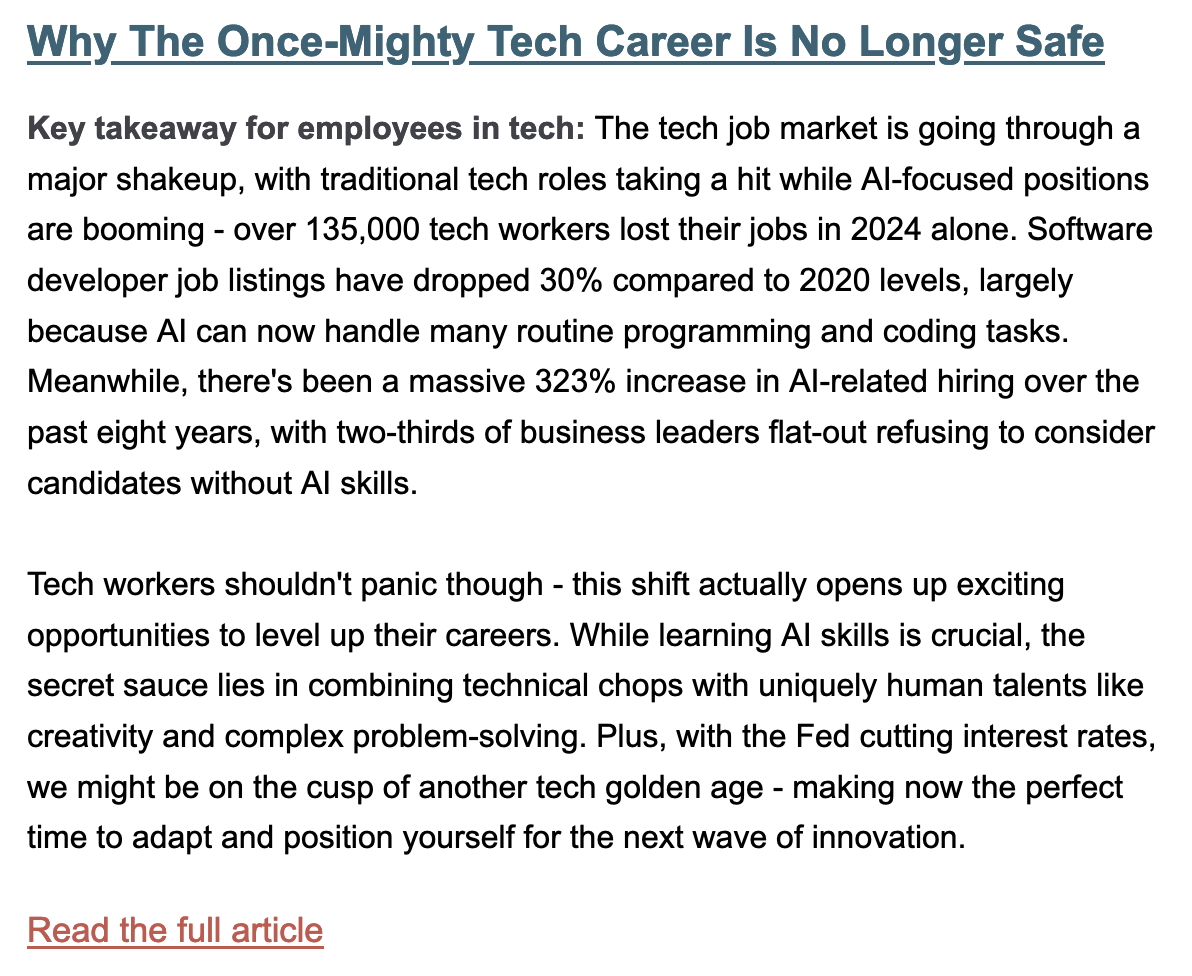
- Use a simple, clean template. Three to ten stories is plenty, with a one-line intro at the top.
- Put anything promotional at the bottom. Featured roles or a “we’re hiring for” section go after the content, never before it.
Each story also makes a ready-made LinkedIn post, so one monthly session gives you a newsletter and weeks of social content.
What if you recruit in several industries? Then you need several newsletters. A few years ago that meant turning into a one-person publishing house. With an agent collecting stories and drafting summaries, it doesn’t anymore. Still, add them one at a time, and only once the last one is running smoothly and earning replies.
Job Stalking: Cold Email That Wins Staffing Clients
You don’t need a list to start email marketing. The fastest way to win new clients with email is what we call job stalking: you find companies that have just posted a job you could fill, and you email the hiring manager to offer help. Every person you contact has a live need, so this is the most effective cold email approach we know for staffing firms. It used to be the hardest to keep up too, because every step was manual research that would make you want to pull your hair out. Agents now handle that research. What they can’t do is judge which leads are worth your time or protect your sending reputation, so those jobs stay with you.
The process, step by step

Before you turn an agent loose, write the brief it will work from. That means the job titles, keywords, locations and company sizes that match your desk, plus the companies you never want to contact (your current clients, for starters). Be as precise as a search query. Software developer or software engineer roles at US fintech companies is a brief. Tech jobs is a recipe for an inbox full of the wrong leads.
- Watch for new jobs. Pull new postings every day from a job postings data feed like TheirStack or Coresignal (or through a tool like Clay that connects to one), and have the agent drop duplicates and companies you’ve already contacted. Whatever you do, don’t point a browsing agent at Indeed or LinkedIn. Both block automated access, and they don’t care whether it’s an old-school scraper or a shiny new AI agent doing the clicking.
- Find and verify the contact. For each posting, the agent finds the hiring manager or the HR lead. Clay’s research agent is very good at this, and Seamless and ZoomInfo work too. Then run every address through a verifier like ZeroBounce or NeverBounce. This part isn’t optional. Agents will confidently hand you an email address or job title that doesn’t exist, and every bounce chips away at your sending domain.
- Draft the opening line. Have the agent read each posting and write one sentence about something specific in it: the tech stack, the location or how long the role has been open. Tell it no praise and no adjectives, and to leave the line blank when the posting gives it nothing real to say. A blank beats “I was so impressed by your company’s commitment to innovation” every time.
- Approve, then send. A human reads every batch before it goes out. Look for wrong names, wrong companies and anything that sounds like a robot wrote it. Then send through Instantly, which is built for cold email, using the job-posting template below.
- Automate the follow-ups. Set up the whole sequence of up to five emails before you start, because there’s no chance you’ll keep up manual follow-ups. Instantly sends each one on schedule and stops the moment someone replies, so nobody gets a “just bumping this up” after they’ve already said yes.
Would you rather someone else did all of this for you? Our done-for-you email marketing service runs job stalking on our own agent system (which goes well beyond anything described here), so you can sit back and let the new client leads come to you.
What to say
Keep every cold email under six sentences. Open with their need (the open role), not your company history. Leave out promotional language, and end with one easy question. Personalize at least the first name, company name and job title. Ready-to-use versions are in the templates section.
What results to expect
The approach works at volume and fails without it. Plan on at least 500 emails a month. A good cold campaign gets a reply rate of around 5%, and that includes people telling you to go away. Here’s what’s changed: with agents doing the research, finding 500 good contacts a month is no longer the hard part. Sending them without landing in spam is. Keep each mailbox to a few dozen cold emails a day, and add mailboxes and domains rather than pushing one harder.
Never use your main email domain
Send cold email from a separate domain, such as yourfirm-talent.com, so a spam complaint can’t hurt the domain your clients and candidates already know. Buy it at cost from a registrar like Cloudflare, add a Google Workspace, Microsoft 365 or Zoho mailbox, and warm it up for at least two weeks with a warm-up tool (Instantly includes one with every account) before sending any campaigns.
Most Placeable Candidate (MPC) Emails
A most placeable candidate (MPC) is a candidate who is highly qualified, available now and realistic about salary, the kind most employers would want to meet. An MPC email introduces that candidate, without naming them, to hiring managers who are likely to need them.
MPC marketing works well, but many recruiters have stopped doing it for two reasons:
- Consistency. You don’t always have a standout candidate, and writing a strong summary takes time. AI fixes the second problem. Hand Claude or ChatGPT the resume with this prompt: Summarize this candidate’s top accomplishments and skills in a single five-sentence paragraph. Do not use the candidate’s name, employers or anything else that could identify them. A recruiter will use this summary to market the candidate to hiring managers.
- Segmentation. An HVAC mechanical engineer should go to your HVAC clients, not to heavy equipment, manufacturing or power generation contacts. An agent can now match each profile to the right client segment in your ATS, which takes most of the pain out of it.
One word of warning: read every profile before it goes out. A rare past employer plus a city can give away exactly who someone is, even without a name, and an agent won’t notice. Use a business AI plan whose terms say your data isn’t used for training, too. A resume is personal information, not prompt fodder.
The easier version: the hypothetical MPC email
If you can’t keep a steady supply of real MPCs, send a hypothetical MPC email once a quarter. Pick the five best candidates you placed last quarter, write a short anonymous profile of each, and send them with an introduction like: If you’re looking for new talent, we have candidates similar to these available to meet with you today. These candidates have already been placed, so the email never goes out of date, and you can plan it like any other quarterly task. A full example is in the templates below.
Recruiter Email Templates You Can Copy
Replace anything in {{double braces}} with your own details or your email tool’s personalization fields.
Client template 1: Cold email after a job posting
Subject: Your {{Job Title}} position
Hi {{First Name}},
I saw that you had an opening for the {{Job Title}} role and thought I’d reach out to see if I can help the {{Company Name}} team.
I have a strong {{Specialty}} candidate who is available to start immediately. Would you be open to a quick chat to see if they’d be a good fit for your team?
If this isn’t a priority right now, I’m still happy to swap notes on the {{Specialty}} talent market.
You can book a time on my {{Calendar Link}}, reply to this email, or call me at {{Phone}}.
{{Signature}}
One tip before you load this into Instantly: give every variable a fallback, so a missing field never leaves a gap like “Hi ,”. Pick fallbacks that still read naturally, because “Hi there” screams template.
Let AI write the first line, not the whole email
Your template is the part you’ve tested, so keep it fixed. Let the agent replace only the first sentence with a line drawn from the posting, like this: Saw you’re hiring a {{Job Title}} to lead the move to AWS. That profile is hard to find in Denver right now.
Here’s a simple test. If the line could have been written without reading the posting, it isn’t personal enough, and you’re better off with the template’s original opening.
Client template 2: Follow-up
Subject: Re: Your {{Job Title}} position
Hi {{First Name}},
Following up on my note about your {{Job Title}} opening. Roles like this are taking our {{Specialty}} clients around {{X}} weeks to fill on their own, and we usually present a shortlist within {{Y}} days.
Worth a 15-minute call this week?
{{Signature}}
Client template 3: Hypothetical MPC email
Subject: {{Specialty}} talent available in {{City}}
Hi {{First Name}},
I specialize in {{Specialty}} recruitment in the {{City}} area and would like to be on your radar if you need recruiting help in the next couple of months.
If you’re looking for new talent, we have candidates similar to these available to meet with you today:
Candidate #1: Controller / Finance Manager
• Controller with a track record of running financial operations and strategic planning.
• Supervises a team of three and oversees month-end close for manufacturing firms.
• Manages banking relationships and planning to support production and supply chain.
Candidate #2: Big Four Senior Associate
• Highly rated Big Four CPA with four busy seasons of audit experience, including manufacturing.
• Experienced with SOX and SEC compliance.
• Strong in accounting policy and research.
{{Three more short profiles}}
Would any of these profiles be a fit for your team?
{{Signature}}
Candidate template: Re-engaging a past candidate
Subject: Quick check-in, {{First Name}}
Hi {{First Name}},
It’s been a while since we last spoke about your next move in {{Specialty}}. I’m seeing more demand than usual for people with your background, and salaries for {{Job Title}} roles in {{City}} have moved since we last talked.
Are you open to hearing about new opportunities, or happy where you are for now? Either answer is helpful. A one-word reply is fine.
{{Signature}}
Write better subject lines with AI
Once an email is written, paste it into Claude or ChatGPT with this prompt: Generate five intriguing subject lines for the email below without resorting to clickbait. Pick the two that best fit your tone, and A/B test them by sending each to half of the segment.
Deliverability: Keep Your Emails Out of Spam
Since 2024, Gmail and Yahoo have required bulk senders to authenticate their email, offer one-click unsubscribe and keep spam complaints below 0.3%. Microsoft began enforcing similar rules for Outlook.com addresses in 2025. Recruiters sending to business addresses are affected too, because much of that mail passes through the same filters.
- Authenticate your domain with SPF, DKIM and DMARC records. Then send a test to mail-tester.com and check that the authentication section shows a perfect score.
- Keep complaints under 0.1%, or one per thousand emails. If you go over it, stop and review your list and copy before sending more.
- Remove contacts who never engage, and never buy lists.
- Keep cold email text-only and on its own domain, as described above.
- Never let an agent send on its own. A human approves every new campaign and every batch, and checks the agent’s opening lines for sameness. I’ll trust an agent with research all day long. I won’t trust one with my sending domain.
The Metrics That Tell You It’s Working
Your email platform reports all of these. Compare your own numbers month to month more than against industry averages, because your list, niche and email type matter more than any benchmark.
- Open rate: the share of recipients who opened the email. Treat it as a rough signal only. Since Apple’s Mail Privacy Protection (2021), Apple Mail preloads emails, which counts many as “opened” even when nobody read them.
- Click-through rate: the share who clicked a link. Across industries the average is around 2%, and this is the best measure of a newsletter.
- Reply rate: the share who replied. This is the number that matters for job stalking and MPC campaigns. Around 5% is a good cold email result.
- Meetings booked and placements: the numbers that pay the bills. Tag every lead from email in your ATS or CRM so you can trace each placement back to the campaign that produced it.
- Spam complaint rate: keep it under 0.1%, as covered above.
Let AI do the counting. Most cold email tools now sort replies for you into interested, not now, wrong person and out of office, so you only read the ones that matter. You can also have an agent pull these numbers into a short weekly summary, so every campaign is in one place.
When you A/B test, change one thing at a time (the subject line, the opening line or the call to action) so you know what made the difference.
Recruitment Email Marketing FAQs
What are the best practices for recruitment email campaigns?
Segment your list into clients and candidates and by industry, send content each segment finds useful, personalize at least the name, company and role, keep cold emails under 150 words, send from an authenticated domain, follow up automatically, and measure replies and meetings rather than opens.
How often should recruiters email clients and candidates?
Send a newsletter every two weeks or once a month, whichever you can keep up consistently. A cold sequence can run up to five emails over two to three weeks, then stop. Most businesses send each contact two to four marketing emails a month, which is a sensible upper limit.
How long should a recruiting email be?
A cold email should be 50 to 150 words. A newsletter can be longer, but break it into short summaries so readers can scan it.
Should recruiting emails include images?
Cold emails should be text only. Newsletters can use a few small images to break up the text, but large images slow loading and can push you toward the spam folder.
When is the best time to send recruiting emails?
Tuesday to Thursday, in the morning or early afternoon of the recipient’s time zone, is a good default. After that, test against your own segments, because candidates often read email in the evening.
Is it legal to cold email potential clients?
Generally yes in the US, provided you follow CAN-SPAM. It’s also generally yes for corporate addresses in the UK, provided you identify yourself and offer an opt-out. Canada and much of the EU require consent. See the legal section above for details.
Can AI write my recruiting emails?
It can write very good drafts, and it’s especially good at a personal first line based on a job posting. Keep a tested template for the rest of the email, read every batch before it goes and rewrite anything that sounds generic. Your readers can spot an email that sounds like everyone else’s, and so can spam filters.
Can an AI agent run job stalking for me?
An agent can do the research: watching for new postings, finding and verifying the hiring manager and drafting the opening line. But a human still needs to approve what gets sent and keep the sending domains healthy. An agent left to send on its own can wreck your domain’s reputation faster than you can say “unsubscribe”.
Should I use my main email account for cold outreach?
No. Use a separate, warmed-up domain so a complaint or a bad campaign can’t damage the reputation of the domain your clients already know.
Wrapping up
Pick one strategy and run it consistently for a quarter. If you have a list, start a monthly newsletter for your biggest practice area. If you don’t, start job stalking with an agent doing the research and the templates above. Track replies and meetings, cut what isn’t working, and add a second strategy once the first runs without you.
Don’t have time to do this properly? Our done-for-you email marketing service runs the whole process for recruiting and staffing firms.
Author